
Download TerMed – Online Appointment Booking App, Healthcare Scheduling Tool, Free Medical App
Overview
TerMed is a free Android application developed by Facharzt-Sofort GmbH, designed to streamline the process of scheduling medical appointments and managing healthcare-related requests. The app enables users to book appointments with healthcare providers directly from their smartphones, offering immediate confirmation via email and automated reminders through push notifications. This functionality helps reduce missed appointments and supports better healthcare planning for individuals and families alike. The app is tailored for patients seeking a convenient, digital alternative to traditional phone-based scheduling.
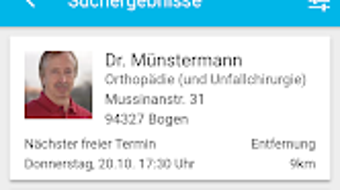
TerMed allows users to send requests for prescription refills, referrals, and appointment bookings without the need for phone calls or in-person visits. It also provides access to essential provider information, including contact details, opening hours, and a list of services offered. This transparency enhances user confidence and facilitates informed decision-making. A notable feature is the family management system, which enables users to oversee appointments for multiple family members from a single interface, centralizing healthcare coordination.
The app is currently available exclusively for Android devices. While the developer has not provided information about broader platform support, the current focus appears to be on mobile accessibility for patients. Users are required to create an account to access online booking and communication features. It should be noted that not all healthcare providers participate in the TerMed network, which may affect availability depending on location and provider involvement.
Key Features & Capabilities
- Online Appointment Booking – Users can schedule medical appointments directly through the app, receiving instant confirmation via email and push notifications, reducing reliance on phone calls.
- Prescription Refill Requests – The app allows users to submit refill requests for medications, streamlining communication with healthcare providers.
- Referral Requests – Patients can initiate referral requests within the app, facilitating faster access to specialists when needed.
- Family Management System – A centralized interface enables users to manage appointments for multiple family members, improving coordination across household healthcare needs.
- Provider Information Access – Users can view provider contact details, opening hours, and a list of services offered, promoting transparency and informed choices.
- Automated Reminders – Push notifications are sent automatically to remind users of upcoming appointments, helping to reduce no-shows and missed visits.
These features are particularly useful for busy individuals and caregivers who manage multiple health appointments. For example, a parent can schedule a pediatric visit, request a prescription refill, and set up a reminder—all within minutes. The centralized family dashboard simplifies oversight, especially for households with elderly members or children requiring regular check-ups. The integration of digital communication tools reduces administrative burden on both patients and providers, contributing to a more efficient healthcare experience.
User Interface, Workflow & Performance
TerMed features a clean, mobile-optimized interface designed for ease of navigation on Android smartphones. The layout prioritizes accessibility, with clearly labeled sections for appointment booking, request submission, and family management. Users can access their appointment history, pending requests, and upcoming visits from a single dashboard, promoting a streamlined workflow.
Navigating between functions is intuitive, with minimal steps required to complete tasks such as submitting a refill request or scheduling a new appointment. The app leverages push notifications to guide users through the process, enhancing user engagement and reducing the likelihood of missed actions. However, the developer did not specify resource usage details, so performance under varying device conditions remains unclear.
General software behavior patterns suggest that the app operates efficiently within standard Android environments, but exact CPU or RAM usage was not disclosed. Stability and responsiveness are expected to align with typical mobile application standards, though real-world performance may vary based on device capabilities and network conditions. The app’s reliance on internet connectivity means that offline functionality is limited to viewing cached data, if any.
Compatibility & System Requirements
TerMed is currently available only for Android devices. The app is designed to run on Android operating systems, though the specific version requirements were not provided. Installation size and hardware specifications were not listed by the developer.
Exact system requirements were not listed. Compatibility information was partially provided, indicating that the app is optimized for smartphones and tablets running Android. Users should ensure their device meets the minimum Android version required by the app, as determined by the Google Play Store at the time of download. The developer did not specify whether tablet support includes full-screen optimization or touch-based navigation enhancements.
For users seeking to install TerMed, it is available through the Google Play Store. No alternative distribution channels were mentioned. It is recommended to check the app’s official page for the most accurate compatibility details before installation.
Pros and Cons
Pros
- Free to download and use with no hidden costs
- Streamlined appointment booking with instant confirmation
- Family management system simplifies healthcare coordination
- Automated reminders help reduce missed appointments
- Access to provider information improves transparency
- Supports prescription refills and referral requests digitally
Cons
- Available only on Android, limiting cross-platform access
- Not all healthcare providers participate in the network
- Requires an account to use core features
- Offline functionality is limited due to reliance on internet connectivity
- Developer did not provide detailed system requirements
FAQ Section
Is TerMed available for iOS devices?
As of now, TerMed is only available for Android devices. The developer has not announced plans for an iOS version.
Is TerMed safe to use?
TerMed is developed by Facharzt-Sofort GmbH and distributed through the official Google Play Store, which applies security checks to apps. Users are advised to download the app only from trusted sources to ensure safety.
How often are updates released?
Update frequency was not specified by the developer. Users can expect updates through the Google Play Store when available.
What type of license does TerMed use?
TerMed is offered as a free application with no subscription or paid features currently available. The licensing model is based on free access with account-based functionality.
Can I use TerMed without an internet connection?
While basic data viewing may be possible offline, core features such as booking appointments, sending requests, and receiving reminders require an active internet connection.
Final Thoughts + CTA
TerMed presents a practical and user-friendly solution for patients aiming to simplify their healthcare scheduling. Its focus on digital appointment booking, automated reminders, and family management makes it especially valuable for individuals managing multiple health needs. The integration of prescription and referral requests adds functional depth, reducing the need for repeated phone calls.
While the app is limited to Android and not all providers are onboard, its free access and intuitive design offer strong value for eligible users. For patients seeking a modern, efficient way to manage medical appointments, TerMed stands out as a reliable tool. The absence of system requirements and cross-platform availability may be drawbacks for some, but the app’s core benefits remain compelling.
Download TerMed now to take control of your healthcare appointments and streamline your medical scheduling process.







